

Back to Unreal Engine
DryreL Software Unreal Engine
Capability Detect Extended
System capability detection for Unreal Engine 5
Detect what the player's machine can do, and scale your game to fit it. Available now on GitHub.
Available on GitHub
- 17Blueprint functions
- 3GPU vendors recognised
- MITFree on GitHub
Overview
What it does
A plugin that reads the CPU, cache, memory, graphics hardware and benchmark scores of the machine your game runs on, so you can scale features to fit. Maintained by DryreL for new Unreal Engine versions.
- Unreal Engine 5
- C++
- Blueprint
- MIT license
Gallery
See it in action

How it works
From zero to working
- DetectCall the detect functions at startup or on a loading screen.
- ComparePerformance indexes use 100 as an average good CPU or GPU: lower is slower, higher is faster.
- ScalePick quality, effects and resolution to match the machine in front of you.
Features
Built to just work
- CPU detectionQuery the processor's capabilities from C++ or Blueprint.
- Cache and memoryRead cache and memory information of the machine.
- RHI wrapperAsk the render hardware interface what the GPU supports.
- SynthBenchmarkWraps Unreal's synthetic benchmark so you can pick quality settings from real scores.
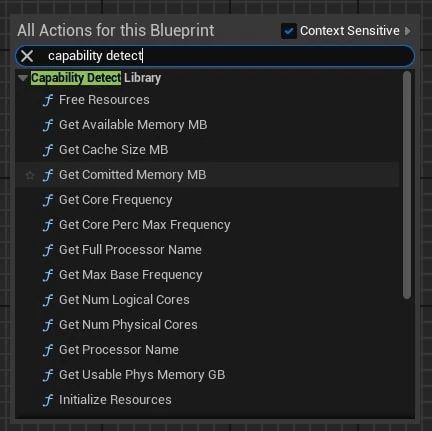
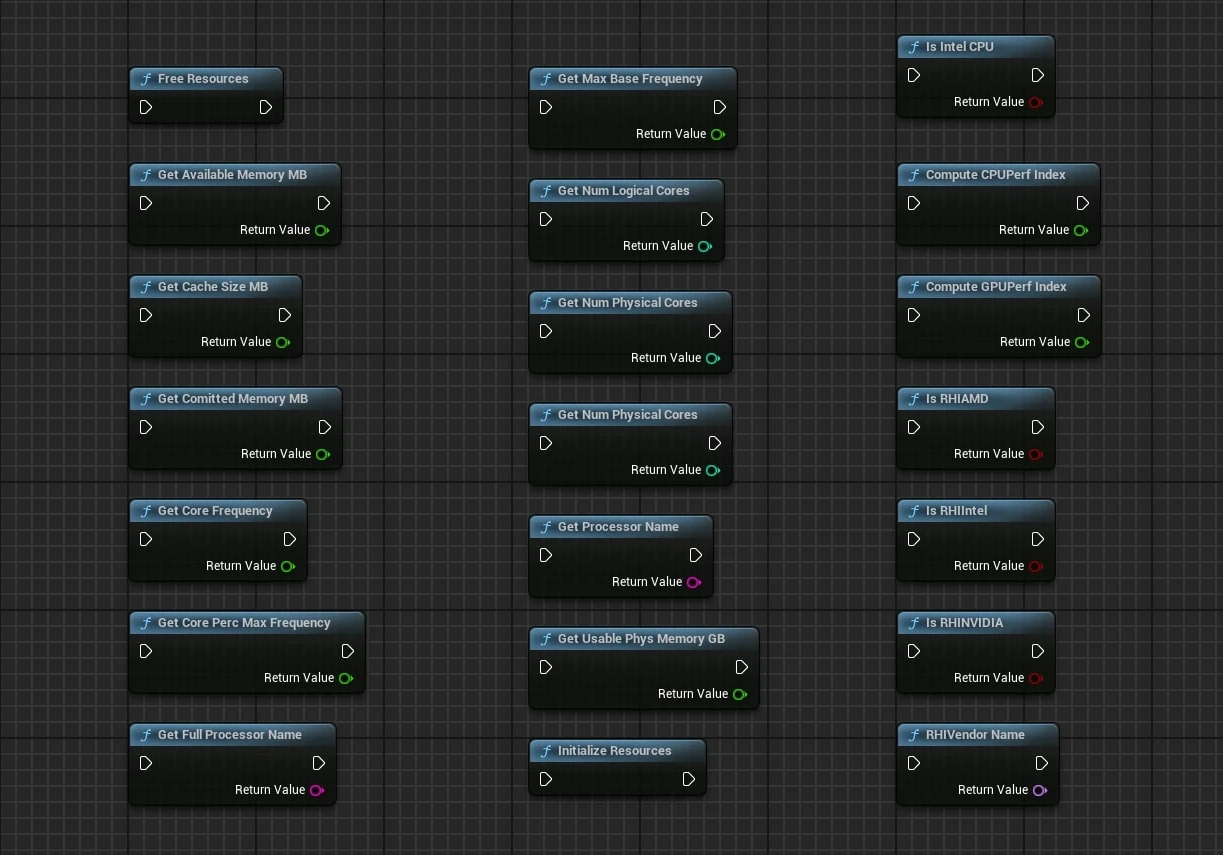
- Blueprint readyEvery detect function is available as a Blueprint node.
- Kept currentOriginally released by Intel. DryreL maintains it so it keeps working with new Unreal Engine versions; no new features are planned.
Reference
Blueprint functions
| Group | Function | Returns |
|---|---|---|
| CPU | IsIntelCPU | True on an Intel CPU |
| CPU | GetNumLogicalCores / GetNumPhysicalCores | Core counts |
| CPU | GetCoreFrequency / GetMaxBaseFrequency | Current and maximum frequency |
| CPU | GetCorePercMaxFrequency | Percent of maximum frequency in use |
| CPU | GetFullProcessorName / GetProcessorName | Long and short processor name |
| Memory | GetUsablePhysMemoryGB | Usable physical memory in GB |
| Memory | GetComittedMemoryMB / GetAvailableMemoryMB | Committed and available memory in MB |
| GPU | IsRHIIntel / IsRHINVIDIA / IsRHIAMD | True for that GPU vendor |
| GPU | RHIVendorName | Vendor name of the GPU |
| Benchmark | ComputeCPUPerfIndex / ComputeGPUPerfIndex | 100 = average good, below is slower, above is faster |
Good to know: The first call of each benchmark function runs the benchmark and is cached afterwards. Call both during startup or a loading screen.
Get started
Install and use
Install
1. Clone or download the repository.
2. Open Plugins/CapabilityDetect/Source/ThirdParty/CapabilityDetectLibrary/CapabilityDetectLibrary.sln
   and build it as Release x64.
3. Right-click the .uproject, choose "Generate Visual Studio project files", then build
   as Development Editor x64.
4. In the editor open Edit, Plugins and confirm Capability Detect is enabled.
Requirements
Before you start
- Unreal Engine 5
- Visual Studio C++ 2022 or JetBrains Rider (to compile the third-party library and the project)
- Windows